
How Does an AI Receptionist Integrate with Practice Management Software?
Linda AI integrates with cloud-based practice management software's such as Dentally, Pearl and Software for Dentists. Live two-way PMS sync, no message-taking. See exactly how it works.

India Healy O'Connor
CEO & CO Founder
What is AI receptionist PMS integration?
AI receptionist practice management software (PMS) integration is the real-time, two-way connection between an AI receptionist and dental practice management software such as Dentally, Pearl, and Software for Dentists.
This integration allows an AI receptionist to:
Access your live appointment calendar
Book patients into correct appointment slots
Follow practice-specific booking rules
Instantly write confirmed bookings back into your PMS
Unlike call answering services or chatbots, a fully integrated AI receptionist does not take messages. It completes the booking during the call.
Most practice owners start with the same question:
"Can an AI Receptionist integrate with Dentally?"
They ask because most practices have been sold a solution that turned out to be a glorified voicemail. A call-answering service that takes messages and promises someone will call back. An AI chatbot that can't see your diary and ignores your calendar zones entirely.
The PMS integration is core to an AI Receptionist. But it also needs to go beyond just an integration.
This article explains exactly how a proper AI receptionist integrates with your PMS. What it can see, what it can do, and why it matters.
See: How an AI receptionist works alongside dental receptionists.
Why PMS integration is non-negotiable
The average dental practice misses approximately 20-30% of incoming calls. Most of those happen at predictable moments: the Monday morning rush, the lunch hour, after 5:30pm. The patient on the other end doesn't wait. They call the next practice on Google.
An AI receptionist solves that gap, but only if it can actually book the appointment when it answers the call. If the AI has to take a message and wait for your team to follow up, you've just recreated the voicemail problem with extra steps.
That's why PMS integration is essential.
Here's what a proper integration does that a message-taking service cannot:
Reads your live calendar in real time
Follows your booking rules
Respects your calendar zones for different clinicians, different surgeries, different treatments
Writes the confirmed appointment directly into your PMS
The appointment appears in your diary exactly as if your receptionist had booked it. Because as far as the PMS is concerned, it was booked the same way.
Without PMS integration:
Calls turn into missed revenue
Staff must manually follow up voicemail messages
Patients book elsewhere
With AI receptionist PMS integration:
Every call becomes a booked appointment
No callbacks required
Your diary updates instantly
Key features of AI receptionist PMS integration
A fully integrated system should:
1. Real-Time Calendar Access
Reads your live diary, not a static snapshot.
2. Intelligent Booking Rules
Linda AI receptionist understands:
Appointment types & treatments
Clinician availability and specialities
Practice-specific workflows (e.g., NHS vs Private)
Surgery constraints
Calendar zones
3. Two-Way PMS Sync
Writes bookings directly into your PMS.
4. Multi-Workflow Support
Handles:
NHS patients
Private patients
Mixed practices
5. Automated Patient Communication
Confirms appointments via SMS and manages follow-up phone calls 24 hours before the appointment date.
Which Practice management systems does Linda AI integrate with?
Linda AI integrates directly with the cloud-based practice management systems such as Dentally, Pearl, and Software for Dentists.
If your PMS isn't on this list, ask the Linda team directly as we do build custom solutions. Integration coverage is constantly expanding.
The integration is full two-way sync. Linda reads from your PMS and writes back to it. That distinction matters. A read-only connection can check availability but can't complete a booking. Two-way sync means the appointment lands in your diary without anyone on your team touching it.
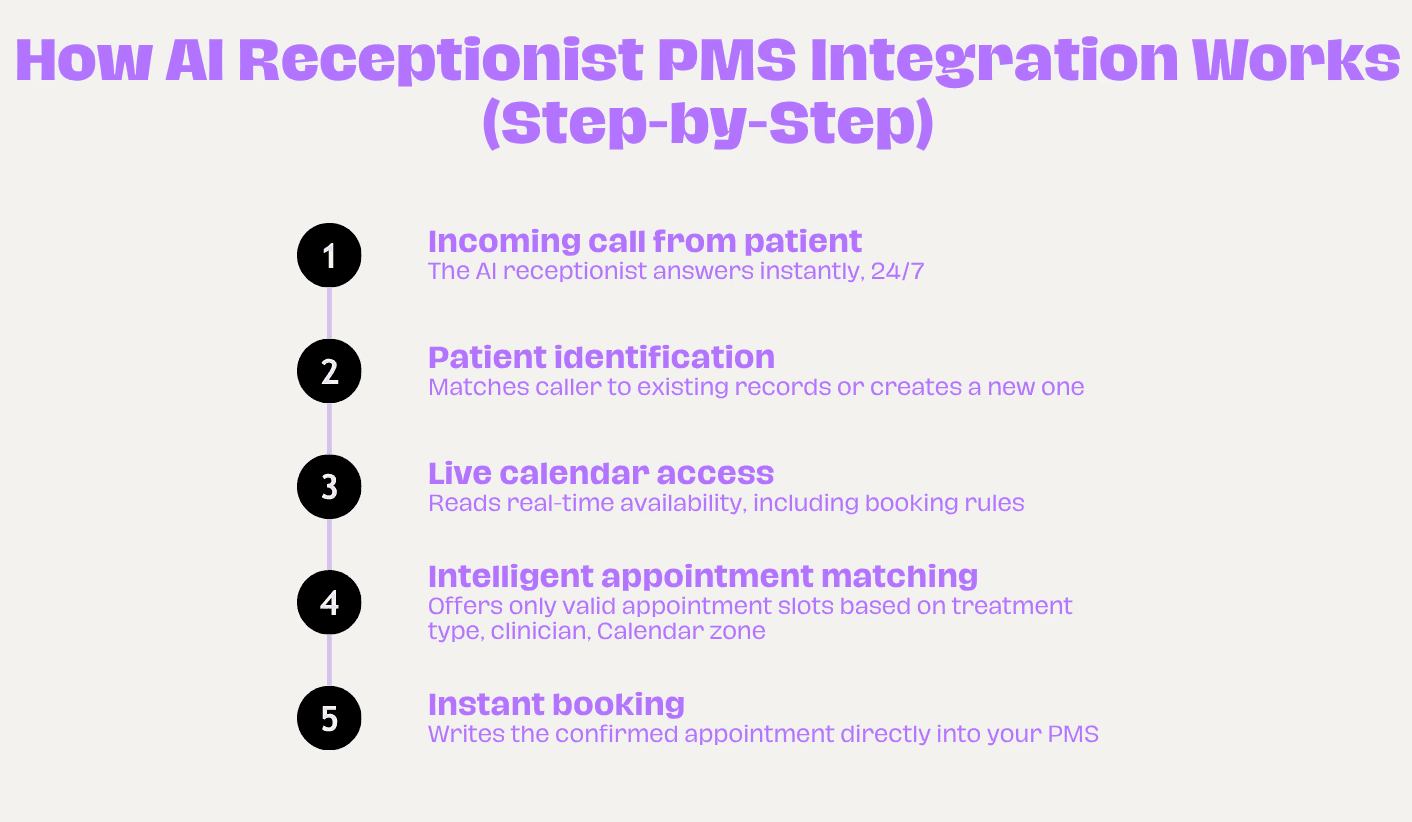
How the PMS integration actually Works: step by step
This is what happens from the moment a patient calls to the moment the appointment is confirmed in your PMS.
Step 1: The call comes in
Linda answers instantly - whether it's 9am on Monday or 9pm on Sunday. Linda picks up.
Step 2: Linda identifies the patient
Linda checks the PMS for an existing patient record. If the number matches a known patient, she has their history available. If they're new, she captures their details and creates a new patient record.
Step 3: Linda reads your live calendar
This is where the integration does its real work. Linda doesn't pull a static snapshot of your diary. She reads your live availability in real time. She can see which appointment types you have configured, which clinician the patient needs or prefers, which calendar zones that appointment type is allowed in, how much time needs to be blocked for the treatment, and whether public or private patient workflows apply.
Step 4: Linda offers the right slots
She presents available options based on your rules. Not just any empty slot, but the right slot. New patient exam goes into a new patient slot. Band 2 treatment doesn't get squeezed into an emergency space. Hygiene appointments don't land in a surgery that's dentist-only.
This is the part that generic AI assistants and chatbots can't do. They don't understand your calendar logic. Linda does, because it's been configured specifically around how your practice works.
Step 5: The appointment is confirmed and written back
The moment the patient confirms, Linda writes the appointment directly into your PMS. It appears in your diary with the correct appointment type, the correct duration, the correct clinician, and the patient's details attached.
Linda then sends an automated confirmation to the patient via SMS, with a deposit link for private patients too.
What separates Linda from everything else: Going beyond an API integration
Any AI can answer a call and look into a calendar. The hard part is booking correctly.
Dental calendars aren't simple grids. They have logic built into every slot. New patient exams only go in specific zones. Emergency appointments can only land in designated emergency slots. Associates have different availability from principals. Some appointment types require a consultation before treatment can be booked.
The challenge we see repeatedly is that an API integration is table stakes - it's not enough on its own. What actually drives results is the agentic operational layer built on top of it: understanding zone configurations, which clinicians accept new patients, cancellation and deposit policies, NHS vs private workflows, and so on. Enterprise solutions typically don't build any of that. While piloting alongside an enterprise provider with a large dental group, the difference in agentic operating was evident - 78% of calls were handled end to end by Linda vs 10% for the competing solution.
The failure point isn’t the conversation. It’s the booking. The AI answers confidently, then puts a new patient into a recall slot, or offers a full arch consultation with your cosmetic dentist. Your team then has to fix it manually. The time saving disappears.
Linda's calendar zones functionality is built specifically to handle this. The configuration mirrors your existing PMS rules, not a simplified version of them. The right patient goes into the right slot. Every time. Without anyone checking.
What happens to appointments already in the diary?
Linda doesn't just handle new bookings. She manages the full appointment lifecycle.
Cancellations: patient calls to cancel, Linda removes the appointment from the PMS and immediately offers the slot to the next available patient on the waitlist.
Reschedules: patient needs to move their appointment, Linda finds a new slot, confirms it, and updates the PMS.
Confirmation calls: Linda contacts patients the day before their appointment. Patients who need to reschedule do so immediately. Across verified Linda deployments, Linda's outbound confirmation calls deliver an average 30% reduction in FTA rates.
The book stays accurate. Your team arrives in the morning not needing to manage a queue of voicemails.
What about Setup? Do I need an IT Team?
Linda's PMS integration is set up by the Linda team, not yours. You don't need IT resource. You don't need to reconfigure your phone system. You don't need to change how your diary is structured.
The setup process: Linda's team connects to your PMS and phone system. Your booking rules, calendar zones, appointment types, and clinician schedules are configured into Linda by our team. Call routing is set up so overflow and out-of-hours calls reach Linda instead of voicemail. Your team reviews the configuration and makes any tweaks they wish.
From sign-up to live: seven days. If there are technical issues on the integration side, the Linda team fixes them at no cost to you.
"Linda AI integrates seamlessly with our cloud-based practice management software and phone system. It has given us the flexibility to handle calls and bookings out of hours and at weekends, while improving appointment confirmations - particularly for patients who hadn't responded to text message reminders."
- Cube Dental
Frequently Asked Questions (FAQs)
What if a patient calls about an existing appointment?
Linda can retrieve the appointment from the PMS, confirm the details with the patient, reschedule if needed, or process a cancellation.
Does Linda work with both NHS and private patient workflows?
Yes. Linda handles public and private patient workflows separately, booking each patient type into the correct slot. Mixed practices running both NHS and private appointments are fully supported.
What if my PMS has custom appointment types or unusual booking rules?
Linda's configuration is built around your specific setup, not a generic template. Custom appointment types, bespoke booking rules, and practice-specific protocols are all configurable. This is handled seamlessly during the setup process by the Linda team.
Can Linda handle multi-site groups with different configurations per site?
Yes. Multi-site groups and DSOs can run Linda across multiple locations with site-specific configurations. Each site's calendar logic, clinician availability, and appointment rules are managed independently.
The Bottom Line
The question "Can it talk to Dentally?" is the right question to ask. Because if the answer is no, nothing else on the feature list matters.
A proper AI receptionist integration means what you see in your PMS and live calendar is always accurate. New patients get booked into the right slot with the right clinician. Cancellations are done in real time. And your team arrives in the morning with a clean diary, not a voicemail queue and a list of callbacks.
Ready to see how Linda AI integrates with your PMS?
Start your 30-day risk-free trial. Linda AI is live in your practice within 7 days, no IT expertise required, no changes to your current telephone system. See real results, free for 30 days.